기존 Hugo Stack 테마에 계층적 카테고리 시스템을 커스텀
개요
기존 카테고리
- 기존 카테고리는 정확하게 태그와 동일한 역할을 했었음
- Hugo Taxonomy가 자동으로 /categories/linux, /categories/middleware 페이지 생성
- 각 카테고리를 독립적인 태그처럼 평면적으로면 취급함
- 각 포스트들에 [”Linux”, “Milldeware”]로 설정이 되어있더라도 Linux, Milldeware 두개의 카테고리가 포스팅에 부여되는 식으로만 동작
- Hugo Taxonomy가 자동으로 /categories/linux, /categories/middleware 페이지 생성
- 이전 사용하던 Jekyll Chirpy 테마처럼 계층적 카테고리를 구현하고 싶었음
커스텀 카테고리
- 메인 카테고리와 서브 카테고리의 2단계 계층 구조
- 자동 카테고리 페이지 생성 코드로
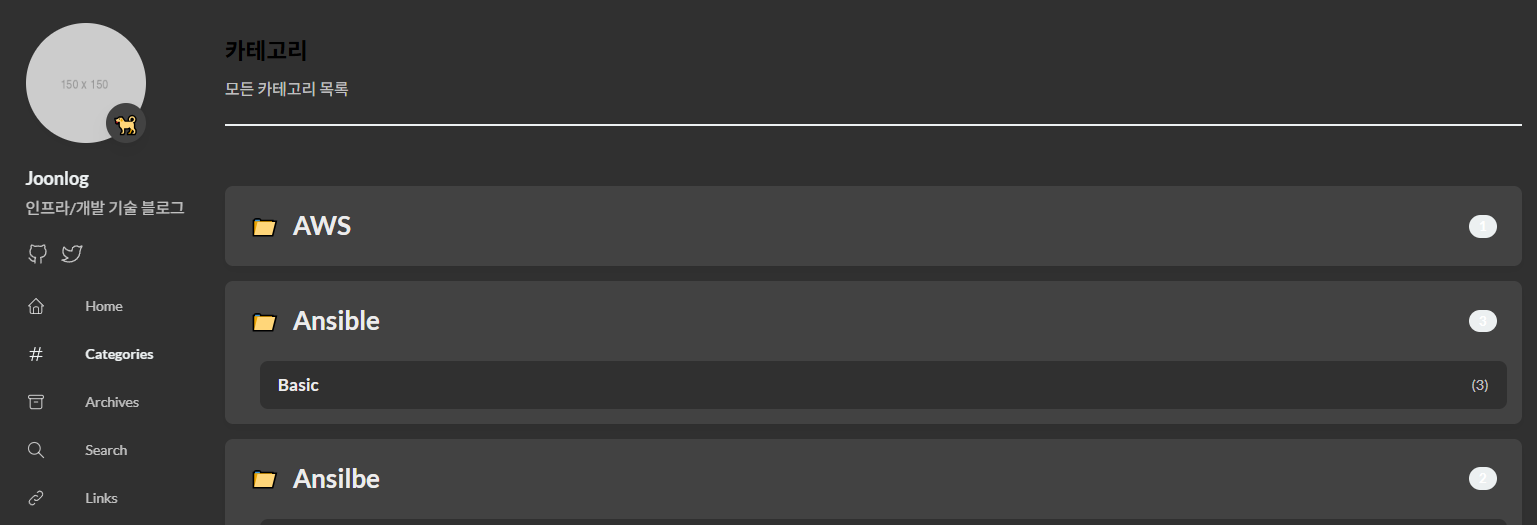
/categories/,/categories/메인/,/categories/메인/서브/3가지 페이지 생성/categories- 전체 카테고리 트리 페이지
- 모든 포스트 스캔 → 메인/서브 카테고리 추출 → 트리 구조로 표시
layouts/categories/list.html
- 전체 카테고리 트리 페이지
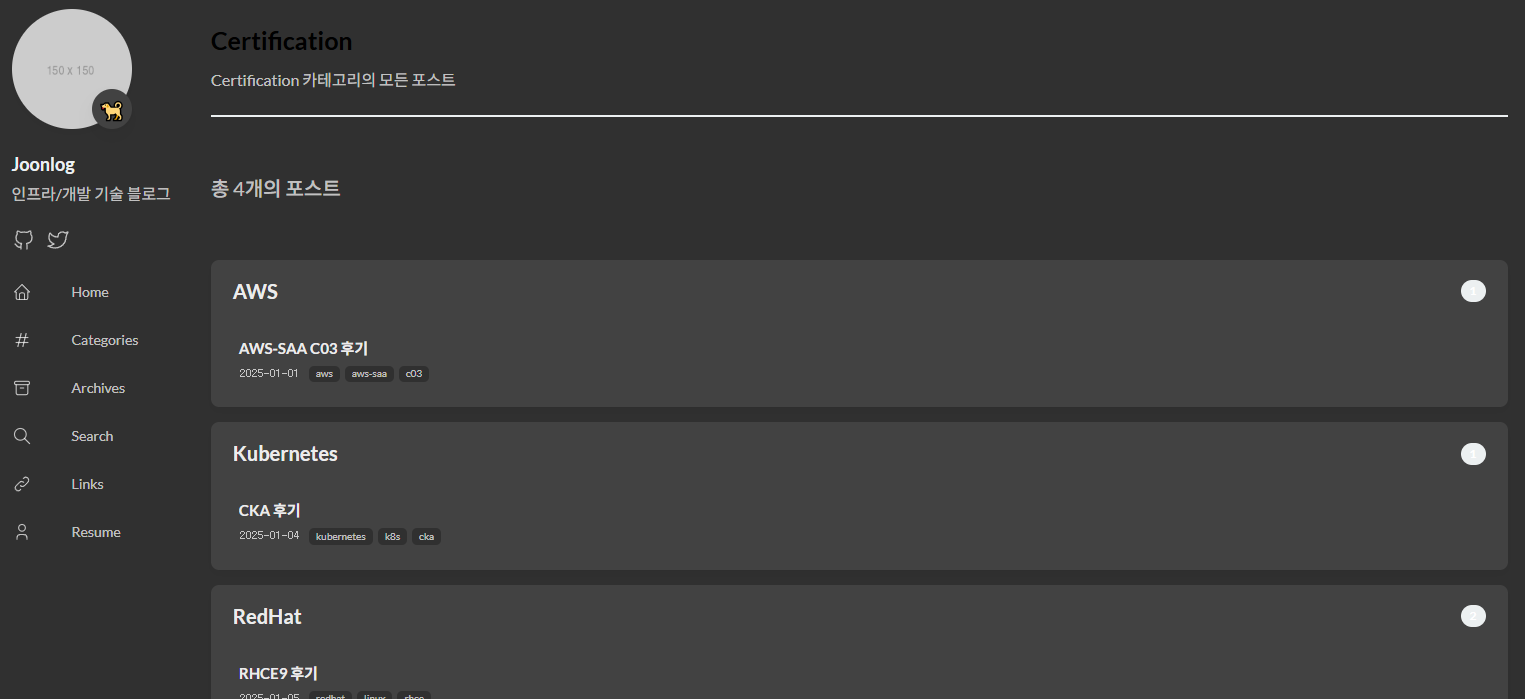
/categories/메인/- 메인 카테고리 아래의 서브 카테고리 목록 페이지
categories[0] == "메인"인 서브 카테고리들만 표시
category-primary.html
- 메인 카테고리 아래의 서브 카테고리 목록 페이지
/categories/메인/서브/- 메인+서브 카테고리 조건을 만족하는 포스트 목록 페이지
categories[0] == "메인" AND categories[1] == "서브”인 포스트만 표시
category-secondary.html
- 메인+서브 카테고리 조건을 만족하는 포스트 목록 페이지
1. 카테고리 페이지 자동 생성 스크립트
scripts/generate-categories.go- Hugo 빌드 전에 실행되어야 하는 전처리 스크립트
- GitHub Actions에서
go run scripts/generate-categories.go명령으로 실행
코드 구조 및 역할
1.1 기본 구조체 정의
각 포스트에서 추출한 카테고리 정보를 저장할 구조체
 1
 2
 3
 4
 5
 6
 7
 8
 9
10
11
12
13
14
package main import ( "fmt" "os" "path/filepath" "regexp" "strings" ) type CategoryInfo struct { Primary string Secondary string }
1.2 main 함수 - 디렉토리 초기화
content/categories디렉토리를 매번 새로 생성- 기존 것 삭제 후 재생성
- 포스트가 삭제되면 해당 카테고리 페이지도 자동으로 삭제되어야 하기 때문
1
2
3
4
5
6
func main() { contentDir := "content/post" categoriesDir := "content/categories" os.RemoveAll(categoriesDir) os.MkdirAll(categoriesDir, 0755)- 기존 것 삭제 후 재생성
1.3 포스트 스캔 및 카테고리 수집
content/post디렉토리의 모든 마크다운 파일 스캔각 파일에서
categories: ["메인", "서브"]형태로 정의된 카테고리 추출categoryMap 구조: map[메인]map[서브]bool
- 예:
{"Linux": {"Middleware": true, "Shell": true}}
 1
 2
 3
 4
 5
 6
 7
 8
 9
10
11
12
13
14
15
16
17
18
19
20
21
22
23
24
categoryMap := make(map[string]map[string]bool) filepath.Walk(contentDir, func(path string, info os.FileInfo, err error) error { if err != nil || info.IsDir() || !strings.HasSuffix(path, ".md") { return nil } content, err := os.ReadFile(path) if err != nil { return nil } cats := extractCategories(string(content)) if len(cats) >= 2 { primary := cats[0] secondary := cats[1] if categoryMap[primary] == nil { categoryMap[primary] = make(map[string]bool) } categoryMap[primary][secondary] = true } return nil })- 예:
extractCategories함수정규식으로 front matter에서
categories: [...]부분 찾기쌍따옴표 제거하고 쉼표로 분리
예:
["Linux", "Middleware"]→[]string{"Linux", "Middleware"}1 2 3 4 5 6 7 8 9 10 11 12 13 14 15 16 17 18 19 20func extractCategories(content string) []string { re := regexp.MustCompile(`categories:\\s*\\[([^\\]]+)\\]`) matches := re.FindStringSubmatch(content) if len(matches) < 2 { return nil } categoriesStr := matches[1] categoriesStr = strings.ReplaceAll(categoriesStr, `"`, "") parts := strings.Split(categoriesStr, ",") var result []string for _, part := range parts { trimmed := strings.TrimSpace(part) if trimmed != "" { result = append(result, trimmed) } } return result }
1.4 메인 카테고리 페이지 생성
메인 카테고리마다
content/page/categories/메인/_index.md생성layout: "category-primary"→ Hugo가layouts/_default/category-primary.html템플릿 사용하도록 설정primary_category파라미터로 필터링에 사용할 카테고리 이름 전달1 2 3 4 5 6 7 8 9 10 11 12for primary, secondaries := range categoryMap { primaryDir := filepath.Join(categoriesDir, strings.ToLower(primary)) os.MkdirAll(primaryDir, 0755) primaryIndexPath := filepath.Join(primaryDir, "_index.md") primaryContent := fmt.Sprintf(`--- title: "%s" layout: "category-primary" primary_category: "%s" --- `, primary, primary) os.WriteFile(primaryIndexPath, []byte(primaryContent), 0644)
1.5 서브 카테고리 페이지 생성
서브 카테고리마다
content/page/categories/메인/서브.md생성layout: "category-secondary"→layouts/_default/category-secondary.html사용하도록 설정두 개의 파라미터로 AND 조건 필터링 가능
1 2 3 4 5 6 7 8 9 10 11 12for secondary := range secondaries { secondaryPath := filepath.Join(primaryDir, strings.ToLower(secondary)+".md") secondaryContent := fmt.Sprintf(`--- title: "%s" layout: "category-secondary" primary_category: "%s" secondary_category: "%s" --- `, secondary, primary, secondary) os.WriteFile(secondaryPath, []byte(secondaryContent), 0644) } }
생성 결과 예시
| |
2. Categories 페이지 템플릿
layouts/categories/list.html- Hugo의 템플릿 우선순위:
layouts/categories/list.html>themes/.../layouts/categories/list.html /categories/URL은 Hugo가 자동으로 categories taxonomy 페이지로 인식- 이 위치에 파일을 두면 테마의 기본 템플릿을 override
템플릿 구조 및 역할
2.1 계층 구조 빌드
테마의
baseof.html에서{{ block "main" . }}를 이 내용으로 대체모든 포스트를 순회하며 계층 구조 빌드
$hierarchy 구조:
{"Linux": ["Middleware", "Shell"], "SCM": ["Kubernetes"]}.Site.RegularPages: Hugo의 모든 일반 페이지.Params.categories: 각 포스트의 front matter에서 categories 배열index $cats 0: 배열의 첫 번째 요소 (메인 카테고리)merge: Go template의 딕셔너리 병합 함수1 2 3 4 5 6 7 8 9 10 11 12 13 14 15 16 17 18 19{{ define "main" }} {{ $hierarchy := dict }} {{ range .Site.RegularPages }} {{ $cats := .Params.categories }} {{ if and $cats (ge (len $cats) 2) }} {{ $main := index $cats 0 }} {{ $sub := index $cats 1 }} {{ if not (index $hierarchy $main) }} {{ $hierarchy = merge $hierarchy (dict $main (slice)) }} {{ end }} {{ $subs := index $hierarchy $main }} {{ $subs = $subs | append $sub }} {{ $hierarchy = merge $hierarchy (dict $main $subs) }} {{ end }} {{ end }}
2.2 메인 카테고리별 포스트 수 계산
uniq: 중복 제거- 같은 서브 카테고리가 여러 포스트에 있을 수 있음
$totalPosts: 해당 메인 카테고리에 속한 전체 포스트 수 계산1 2 3 4 5 6 7 8 9 10 11 12{{ range $mainCat, $subCats := $hierarchy }} {{ $subCats = uniq $subCats | sort }} {{ $totalPosts := 0 }} {{ range $.Site.RegularPages }} {{ $cats := .Params.categories }} {{ if and $cats (ge (len $cats) 1) }} {{ if eq (index $cats 0) $mainCat }} {{ $totalPosts = add $totalPosts 1 }} {{ end }} {{ end }} {{ end }}
2.3 토글 UI
<details>: 토글open속성: 기본적으로 펼쳐진 상태urlize: URL 안전 문자열로 변환- “Linux Kernel” → “linux-kernel”
/categories/linux/→scripts/generate-categories.go가 생성한_index.md페이지로 이동1 2 3 4 5 6 7 8<details class="category-group" open> <summary class="main-cat"> <span class="main-cat-title"> <span class="icon">📁</span> <a href="{{ printf "/categories/%s/" ($mainCat | urlize) }}">{{ $mainCat }}</a> </span> <span class="post-count-badge">{{ $totalPosts }}</span> </summary>
2.4 서브 카테고리 목록
각 서브 카테고리의 포스트 개수 계산
AND 조건:
categories[0] == mainCat AND categories[1] == subCat/categories/linux/middleware/→generate-categories.go가 생성한middleware.md페이지로 이동1 2 3 4 5 6 7 8 9 10 11 12 13 14 15 16 17 18 19 20<div class="sub-cats"> {{ range $subCat := $subCats }} {{ $count := 0 }} {{ range $.Site.RegularPages }} {{ $cats := .Params.categories }} {{ if and $cats (ge (len $cats) 2) }} {{ if and (eq (index $cats 0) $mainCat) (eq (index $cats 1) $subCat) }} {{ $count = add $count 1 }} {{ end }} {{ end }} {{ end }} <a href="{{ printf "/categories/%s/%s/" ($mainCat | urlize) ($subCat | urlize) }}" class="sub-cat-link"> <span class="sub-cat-name">{{ $subCat }}</span> <span class="count">({{ $count }})</span> </a> {{ end }} </div> </details> {{ end }}
2.5 스타일링
인라인 CSS: 이 페이지에만 적용되는 스타일
var(--accent-color): 테마에서 정의한 CSS 변수 사용 (다크 모드 대응)1 2 3 4 5 6 7 8 9<style> .page-header { margin-bottom: 2rem; padding-bottom: 1rem; border-bottom: 2px solid var(--accent-color); } /* ... 나머지 CSS ... */ </style> {{ end }}
3. 메인 카테고리 페이지 템플릿
- 파일 위치:
layouts/_default/category-primary.html generate-categories.go가 생성한_index.md에서layout: "category-primary"지정- Hugo는
layouts/_default/디렉토리에서 커스텀 레이아웃을 찾음 - 파일명이
category-primary.html이므로layout: "category-primary"와 매칭
템플릿 구조 및 역할
3.1 포스트 필터링
.Params.primary_category:generate-categories.go가 front matter에 추가한 파라미터필터링 조건:
categories[0] == $primaryCat$posts: 필터링된 포스트 목록 (slice)1 2 3 4 5 6 7 8 9 10 11{{ $primaryCat := .Params.primary_category }} {{ $posts := slice }} {{ range .Site.RegularPages }} {{ $cats := .Params.categories }} {{ if and $cats (ge (len $cats) 1) }} {{ if eq (index $cats 0) $primaryCat }} {{ $posts = $posts | append . }} {{ end }} {{ end }} {{ end }}
3.2 서브 카테고리 추출
필터링된 포스트들에서 서브 카테고리 목록 추출
in: Go template의 배열 포함 여부 확인 함수알파벳 순으로 정렬
1 2 3 4 5 6 7 8 9 10 11{{ $subCategories := slice }} {{ range $posts }} {{ $cats := .Params.categories }} {{ if ge (len $cats) 2 }} {{ $sub := index $cats 1 }} {{ if not (in $subCategories $sub) }} {{ $subCategories = $subCategories | append $sub }} {{ end }} {{ end }} {{ end }} {{ $subCategories = $subCategories | uniq | sort }}
3.3 서브 카테고리별 그룹핑
서브 카테고리별로 그룹핑하여 표시
각 그룹의 포스트 개수 배지로 표시
1 2 3 4 5 6 7 8 9 10 11 12 13 14{{ range $subCat := $subCategories }} {{ $postCount := 0 }} {{ range $posts }} {{ $cats := .Params.categories }} {{ if and (ge (len $cats) 2) (eq (index $cats 1) $subCat) }} {{ $postCount = add $postCount 1 }} {{ end }} {{ end }} <details class="sub-category-group" open> <summary class="sub-category-title"> <span class="title-text">{{ $subCat }}</span> <span class="post-count-badge">{{ $postCount }}</span> </summary>
3.4 포스트 목록 렌더링
각 서브 카테고리 내의 포스트 목록 표시
.RelPermalink: 포스트의 상대 URLfirst 3: 태그가 많을 경우 처음 3개만 표시{{ with }}: 값이 존재할 때만 실행1 2 3 4 5 6 7 8 9 10 11 12 13 14 15 16 17 18 19 20 21 22 23 24<div class="post-list"> {{ range $posts }} {{ $cats := .Params.categories }} {{ if and (ge (len $cats) 2) (eq (index $cats 1) $subCat) }} <article class="post-item"> <a href="{{ .RelPermalink }}" class="post-link"> <h3 class="post-title">{{ .Title }}</h3> <div class="post-meta"> <time>{{ .Date.Format "2006-01-02" }}</time> {{ with .Params.tags }} <span class="tags"> {{ range first 3 . }} <span class="tag">{{ . }}</span> {{ end }} </span> {{ end }} </div> </a> </article> {{ end }} {{ end }} </div> </details> {{ end }}
4. 서브 카테고리 페이지 템플릿
layouts/_default/category-secondary.htmlgenerate-categories.go가 생성한middleware.md에서layout: "category-secondary"지정layouts/_default/category-secondary.html과 매칭
템플릿 구조 및 역할
4.1 Breadcrumb 네비게이션
Breadcrumb 네비게이션:
Linux › Middleware메인 카테고리 클릭 시 메인 카테고리 페이지로 이동
1 2 3 4 5 6 7 8 9 10<header class="page-header"> <div class="breadcrumb"> <a href="{{ printf "/categories/%s/" (.Params.primary_category | urlize) }}"> {{ .Params.primary_category }} </a> <span class="separator">›</span> <span class="current">{{ .Title }}</span> </div> <h1>{{ .Title }}</h1> </header>
4.2 AND 조건 필터링
AND 조건 필터링:
categories[0] == primary AND categories[1] == secondary두 파라미터 모두
generate-categories.go가 front matter에 추가1 2 3 4 5 6 7 8 9 10 11 12{{ $primaryCat := .Params.primary_category }} {{ $secondaryCat := .Params.secondary_category }} {{ $posts := slice }} {{ range .Site.RegularPages }} {{ $cats := .Params.categories }} {{ if and $cats (ge (len $cats) 2) }} {{ if and (eq (index $cats 0) $primaryCat) (eq (index $cats 1) $secondaryCat) }} {{ $posts = $posts | append . }} {{ end }} {{ end }} {{ end }}
4.3 포스트 목록
필터링된 포스트 목록만 표시
서브 카테고리 그룹핑 없이 플랫한 리스트
1 2 3 4 5 6 7 8 9 10 11 12 13 14 15 16 17 18 19 20 21 22 23 24 25<div class="post-count"> 총 {{ len $posts }}개의 포스트 </div> <section class="category-posts"> <div class="post-list"> {{ range $posts }} <article class="post-item"> <a href="{{ .RelPermalink }}" class="post-link"> <h3 class="post-title">{{ .Title }}</h3> <div class="post-meta"> <time>{{ .Date.Format "2006-01-02" }}</time> {{ with .Params.tags }} <span class="tags"> {{ range first 3 . }} <span class="tag">{{ . }}</span> {{ end }} </span> {{ end }} </div> </a> </article> {{ end }} </div> </section>
5. GitHub Actions 워크플로우 수정
.github/workflows/deploy.yml추가한 부분
generate-categories.go실행 →content/page/categories/디렉토리 생성- Hugo 빌드 → 생성된 카테고리 페이지들을 포함하여 정적 사이트 생성
1
2
3
4
5
- name: Generate category pages run: go run scripts/generate-categories.go - name: Build run: hugo --minify --gc
6. 메뉴 설정
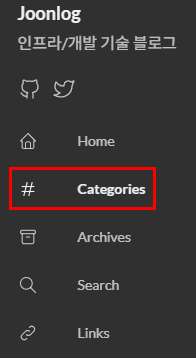
config/_default/menu.tomlidentifier: Hugo가 이 메뉴 항목을 식별하는 고유 IDname: 사용자에게 표시될 메뉴 이름url: 클릭 시 이동할 경로weight: 메뉴 정렬 순서 (낮을수록 위에 표시)icon: 테마의assets/icons/categories.svg아이콘 사용
1 2 3 4 5 6 7[[main]] identifier = "categories" name = "Categories" url = "/categories/" weight = 2 [main.params] icon = "categories"Archives weight 조정
content/page/archives/index.md
1 2 3menu: main: weight: 3 # 기존 2에서 3으로 변경
구현 화면
메뉴
/categories 페이지
/categories/메인 페이지
/categories/메인/서브 페이지