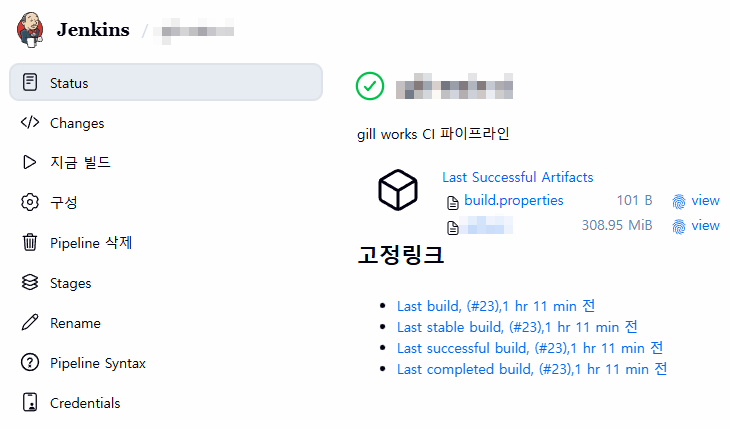
Java 1.8 애플리케이션에 대한 CI/CD 파이프라인 설정 방법
환경
- Git 리포지토리 및 컨테이너 레지스트리: GitLab
- CI/CD: Jenkins
- Java 버전: 1.8
- 빌드 툴: Maven
- 파이프라인을 컨테이너에서 동작시키기 위한 Jenkins Agent 도커 설정
파이프라인 설정
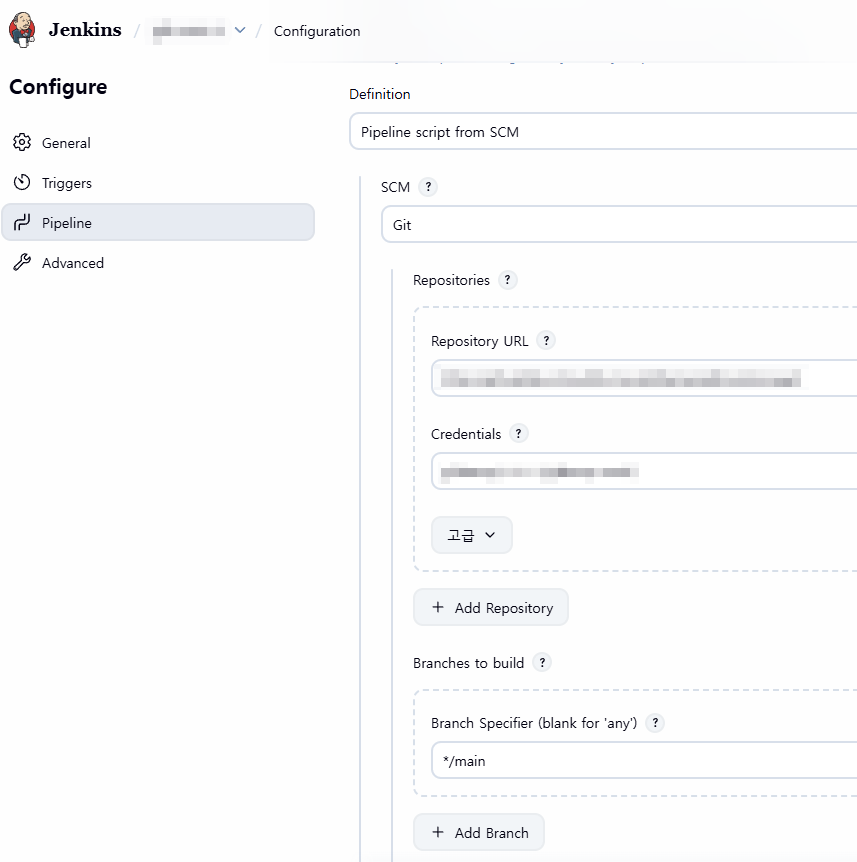
- Git 리포지토리 연동
Definition: Pipeline script from SCM
- 파이프라인 구성에 필요한 스크립트를 SCM에서 가져오도록 설정
SCM: Git
Repository URL: Git 리포지토리 URL
Credentials: Git 리포지토리에 접근 가능하도록 저장한 Credential
Branch Specifier: */main
CI 파이프라인
- 컨테이너 이미지를 빌드하기 위한 Dockerfile도 Git 리포지토리에 있어야 함
- Java는 빌드 과정이 필요한 컴파일 언어이기 때문에 소스 빌드 → 이미지 빌드 → 이미지 푸시 과정이 필요
환경
- agent any로 jenkins agent 컨테이너를 파이프라인으로 사용
 1
 2
 3
 4
 5
 6
 7
 8
 9
10
11
12
13
14
| pipeline {
agent any
environment {
WAR_FILE = '<WAR파일명>'
BUILD_PROFILE = '<개발/운영>'
MAVEN_OPTS = '-Xmx1024m -XX:MaxPermSize=256m'
// Docker & GitLab Registry settings
DOCKER_IMAGE = '<이미지명>'
GITLAB_REGISTRY = '<컨테이너 레지스트리 URL>'
GITLAB_PROJECT = '<Git 리포지토리명>'
GITLAB_CREDENTIAL_ID = '<저장한 Git PAT 토큰 ID>'
}
|
소스코드 체크아웃
- Git 리포지토리의 최신 커밋을 체크아웃
- 파이프라인 로그에 커밋 정보 출력
1
2
3
4
5
6
7
| stages {
stage('Checkout') {
steps {
checkout scm
sh 'git log -1 --oneline'
}
}
|
Maven 빌드
- Maven 컨테이너를 사용해서 소스 빌드
- 로컬
~/.m2 디렉토리를 컨테이너하고 공유해서 의존성 캐시 재사용
 1
 2
 3
 4
 5
 6
 7
 8
 9
10
11
12
13
14
15
16
17
18
19
20
21
22
23
24
25
| stage('Build') {
agent {
docker {
image 'maven:3.9.11-eclipse-temurin-8'
args '-v $HOME/.m2:/root/.m2'
reuseNode true
}
}
steps {
script {
def settingsParam = fileExists('settings.xml') ? '-s settings.xml' : ''
sh """
mvn clean package -P ${BUILD_PROFILE} -DskipTests=true ${settingsParam} \
-Dmaven.compiler.source=1.8 \
-Dmaven.compiler.target=1.8
"""
sh """
test -f target/${WAR_FILE} || (echo "WAR file not found" && exit 1)
ls -lh target/${WAR_FILE}
"""
}
}
}
|
Artifact 보관
 1
 2
 3
 4
 5
 6
 7
 8
 9
10
11
12
13
14
15
16
17
18
19
20
21
| stage('Archive') {
steps {
script {
def gitCommit = sh(returnStdout: true, script: 'git rev-parse --short HEAD').trim()
def gitBranch = sh(returnStdout: true, script: 'git rev-parse --abbrev-ref HEAD').trim()
def buildTime = sh(returnStdout: true, script: 'date "+%Y-%m-%d %H:%M:%S"').trim()
writeFile file: 'build.properties', text: """BUILD_NUMBER=${env.BUILD_NUMBER}
BUILD_PROFILE=${BUILD_PROFILE}
GIT_COMMIT=${gitCommit}
GIT_BRANCH=${gitBranch}
BUILD_TIME=${buildTime}
"""
}
archiveArtifacts artifacts: "target/${WAR_FILE}, build.properties", fingerprint: true
// WAR 파일을 workspace root로 복사 (Docker 빌드용)
sh "cp target/${WAR_FILE} ."
}
}
|
컨테이너 이미지 빌드 및 레지스트리 푸시
- Git 리포지토리에 있는 Dockerfile을 기반으로 이미지 빌드
- Git 커밋 해시와 Jenkins 빌드 번호를 조합해서 태그 생성
- GitLab PAT 토큰으로 로그인 후 푸시
 1
 2
 3
 4
 5
 6
 7
 8
 9
10
11
12
13
14
15
16
17
18
19
20
21
22
23
24
25
26
27
28
29
30
31
32
| stage('Docker Build & Push') {
steps {
script {
def gitCommit = sh(returnStdout: true, script: 'git rev-parse --short HEAD').trim()
def imageTag = "${env.BUILD_NUMBER}-${gitCommit}"
def fullImageName = "${GITLAB_REGISTRY}/${GITLAB_PROJECT}/${DOCKER_IMAGE}"
// Docker 이미지 빌드
sh """
docker build -t ${fullImageName}:${imageTag} .
docker tag ${fullImageName}:${imageTag} ${fullImageName}:latest
"""
// GitLab Container Registry 로그인 및 푸시
withCredentials([usernamePassword(credentialsId: "${GITLAB_CREDENTIAL_ID}",
usernameVariable: 'GITLAB_USER',
passwordVariable: 'GITLAB_TOKEN')]) {
sh """
echo "\$GITLAB_TOKEN" | docker login ${GITLAB_REGISTRY} -u "\$GITLAB_USER" --password-stdin
docker push ${fullImageName}:${imageTag}
docker push ${fullImageName}:latest
docker logout ${GITLAB_REGISTRY}
"""
}
echo "Docker image pushed: ${fullImageName}:${imageTag}"
echo "Docker image pushed: ${fullImageName}:latest"
}
}
}
}
}
|
CD 파이프라인
- Jenkins 서버에서 배포할 서버에 SSH로 접근 후 docker compose 파일을 기동하여 컨테이너 레지스트리의 이미지를 가져오는 방식으로 배포
- 배포할 서버가 여러 개일 경우를 고려해서 구성
환경
- agent any로 jenkins agent 컨테이너를 파이프라인으로 사용
 1
 2
 3
 4
 5
 6
 7
 8
 9
10
11
12
13
14
15
16
17
18
| pipeline {
agent any
parameters {
string(name: 'IMAGE_TAG', defaultValue: 'latest', description: 'Docker image tag to deploy')
choice(name: 'DEPLOY_TARGET', choices: ['WAS1', 'ALL'], description: 'WAS1: <IP/HOSTNAME> | ALL: 전체 WAS 배포')
}
environment {
WAS1_HOST = '<WAS1 서버 IP>'
// WAS2_HOST = '<WAS2 서버 IP>' // TODO: WAS2 추가 시 활성화
DEPLOY_PATH = '<배포 경로>'
GITLAB_REGISTRY = '<컨테이너 레지스트리 URL>'
GITLAB_PROJECT = '<Git 리포지토리명>'
IMAGE_NAME = '<컨테이너 이미지 명>'
DEPLOY_CREDENTIAL_ID = '<배포 서버 SSH 계정명>'
GITLAB_CREDENTIAL_ID = '<저장한 Git PAT 토큰 ID>'
}
|
준비
배포할 이미지 태그 / 배포 대상 서버를 선택할 수 있게 설정- deployHosts: 배포 대상 호스트 목록
 1
 2
 3
 4
 5
 6
 7
 8
 9
10
11
12
13
14
15
16
17
18
19
20
| stages {
stage('Prepare') {
steps {
script {
echo "Deploying image: ${GITLAB_REGISTRY}/${GITLAB_PROJECT}/${IMAGE_NAME}:${params.IMAGE_TAG}"
echo "Deploy target: ${params.DEPLOY_TARGET}"
def deployHosts = []
if (params.DEPLOY_TARGET == 'WAS1') {
deployHosts = [WAS1_HOST]
} else if (params.DEPLOY_TARGET == 'ALL') {
deployHosts = [WAS1_HOST]
// TODO: WAS2 추가 시 -> deployHosts = [WAS1_HOST, WAS2_HOST]
}
env.DEPLOY_HOSTS = deployHosts.join(',')
echo "Target servers: ${env.DEPLOY_HOSTS}"
}
}
}
|
배포
- 컨테이너 레지스트리에서 이미지 풀링
- 배포 경로에서 docker compose 명령어를 통한 애플리케이션 재기동
 1
 2
 3
 4
 5
 6
 7
 8
 9
10
11
12
13
14
15
16
17
18
19
20
21
22
23
24
25
26
27
28
29
30
31
32
33
34
35
36
37
38
39
40
41
42
43
44
45
46
47
48
49
| stage('Deploy') {
steps {
script {
def hosts = env.DEPLOY_HOSTS.split(',')
withCredentials([
usernamePassword(credentialsId: "${DEPLOY_CREDENTIAL_ID}",
usernameVariable: 'DEPLOY_USER',
passwordVariable: 'DEPLOY_PASS'),
usernamePassword(credentialsId: "${GITLAB_CREDENTIAL_ID}",
usernameVariable: 'GITLAB_USER',
passwordVariable: 'GITLAB_TOKEN')
]) {
for (host in hosts) {
echo "Deploying to ${host}..."
sh """
sshpass -p "\$DEPLOY_PASS" ssh -o StrictHostKeyChecking=no \$DEPLOY_USER@${host} "
cd ${DEPLOY_PATH}
# GitLab Registry 로그인
echo 'Logging in to GitLab Registry...'
echo "\$GITLAB_TOKEN" | sudo docker login ${GITLAB_REGISTRY} -u "\$GITLAB_USER" --password-stdin
# 이미지 Pull
echo 'Pulling image: ${GITLAB_REGISTRY}/${GITLAB_PROJECT}/${IMAGE_NAME}:${params.IMAGE_TAG}'
sudo docker pull ${GITLAB_REGISTRY}/${GITLAB_PROJECT}/${IMAGE_NAME}:${params.IMAGE_TAG}
# 컨테이너 재배포
echo 'Redeploying containers...'
export IMAGE_TAG=${params.IMAGE_TAG}
sudo docker compose down
sudo docker compose up -d
# 배포 확인
echo 'Checking deployment status...'
sudo docker compose ps
# 로그아웃
sudo docker logout ${GITLAB_REGISTRY}
"
"""
echo "Deployment to ${host} completed."
}
}
}
}
}
|
헬스 체크
 1
 2
 3
 4
 5
 6
 7
 8
 9
10
11
12
13
14
15
16
17
18
19
20
21
22
23
24
25
26
27
28
29
30
31
32
| stage('Health Check') {
steps {
script {
echo "Waiting for application to start..."
sleep 10
def hosts = env.DEPLOY_HOSTS.split(',')
withCredentials([usernamePassword(credentialsId: "${DEPLOY_CREDENTIAL_ID}",
usernameVariable: 'DEPLOY_USER',
passwordVariable: 'DEPLOY_PASS')]) {
for (host in hosts) {
echo "Health checking ${host}..."
sh """
sshpass -p "\$DEPLOY_PASS" ssh -o StrictHostKeyChecking=no \$DEPLOY_USER@${host} "
# 컨테이너 상태 확인
sudo docker ps | grep main
# 헬스체크 (옵션)
# curl -f http://localhost:8080/health || exit 1
"
"""
echo "${host} health check passed."
}
}
}
}
}
}
}
|